Recent phone activity
Shows a confidence level based on recent screen interaction. Optional usage access can improve that confidence without storing app names.
Ruxum can bring together recent phone activity, compatible Health Connect data, and optional home or away events. Every signal keeps its source, freshness, permission, and reliability limits visible so the family knows when to check in—not when to assume everything is fine.
Ruxum does not collapse different signals into a single “safe” score. Each one answers a narrower question and can be unavailable, delayed, or incomplete.
Shows a confidence level based on recent screen interaction. Optional usage access can improve that confidence without storing app names.
Shows available steps, heart-rate, and sleep context with its source and last-sync time when a compatible source and permission exist.
Uses optional location permission for specific home-zone and urgent-help events—not a continuously updating map or detailed route history.
Shows whether notifications, monitoring, background operation, and optional location are ready or need attention.
Preserves when information was last updated and where it came from, so old or absent data is not mistaken for a current observation.
Turns uncertainty into a family action: review the signal, contact the Senior, involve the care owner, and escalate outside Ruxum when necessary.
When the Senior connects Android Health Connect and grants access, Ruxum can organize compatible health context for the family without presenting it as a live clinical feed.
A connected source does not prove that a wearable was worn, that a reading is complete, or that the Senior is well. Ruxum does not diagnose or replace medical advice.
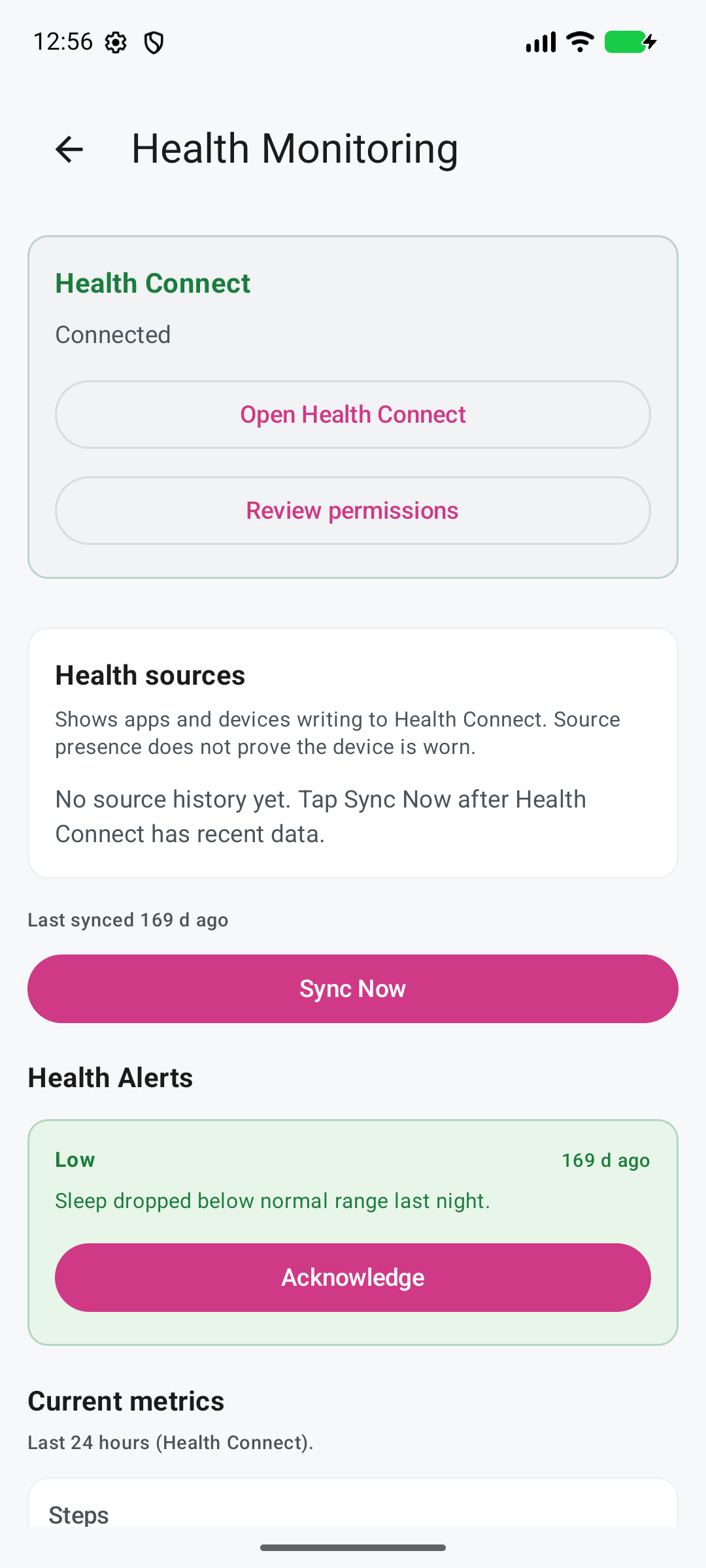
This screenshot uses fictional demonstration data and deliberately shows an old sync time. That is the point: stale data stays visible instead of silently looking current.
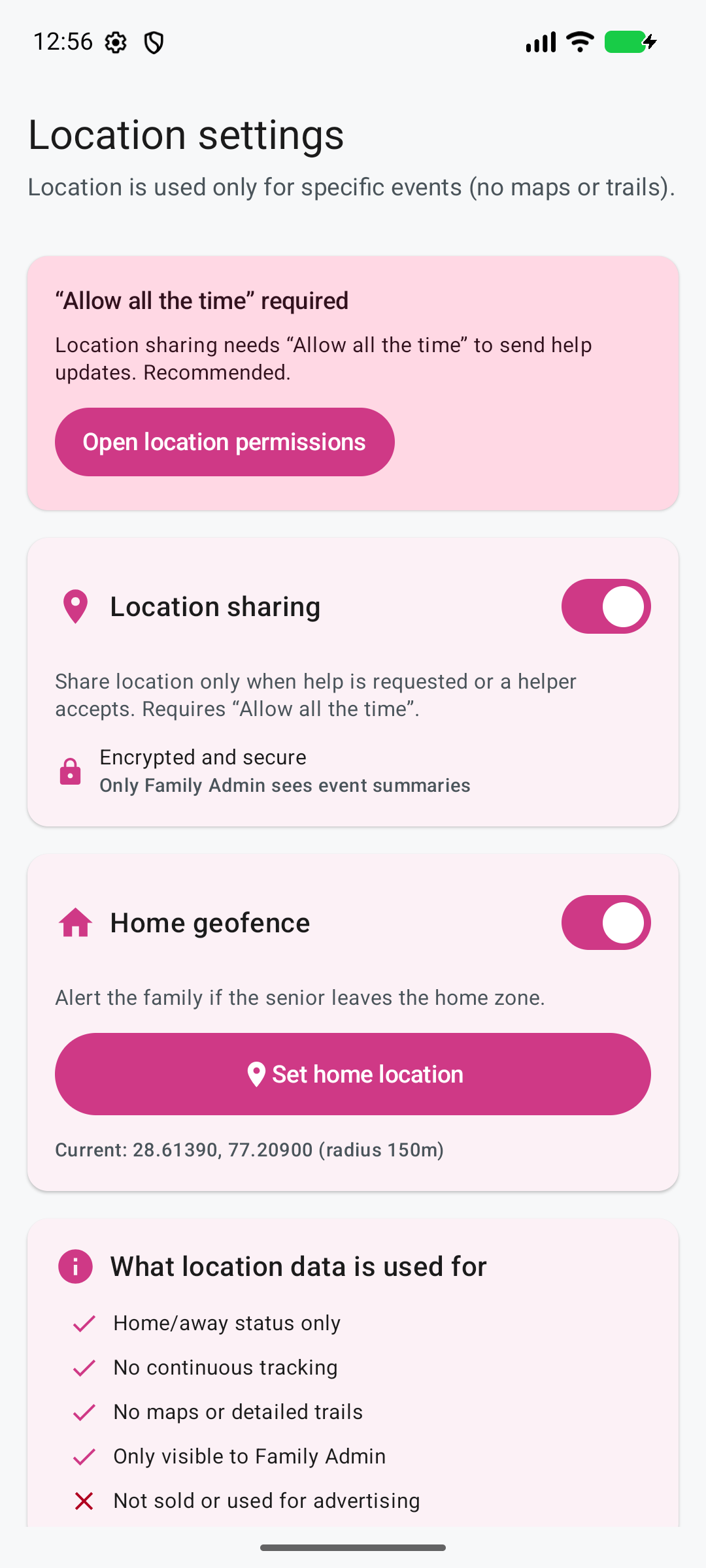
This screenshot uses fictional home-zone details. The screen states who can see event summaries, what the data is used for, and that continuous tracking, maps, trails, advertising, and data sale are outside the feature.
Location support is optional and off by default. The Senior can choose whether Ruxum uses it for bounded family-care events.
Ruxum does not provide continuous tracking, a live map, or detailed movement trails. Permission, phone settings, battery state, and connectivity can make an event late or unavailable.
See reduced or unknown activity confidence, an old health sync, a missing permission, or a monitoring setup issue.
Review the source, timestamp, phone state, and whether the Senior intended to share that signal.
Call or message the Senior or a trusted person nearby when the situation needs direct confirmation.
Use the family care network or the appropriate emergency service when the facts indicate an urgent concern.
A careful family-care tool should say what it does not know as plainly as what it knows.
Recent activity, a health reading, or a home event does not prove that the Senior is safe or does not need help.
A phone interaction does not prove who used or carried the device.
Ruxum is not a camera system, staffed monitoring centre, or always-on medical observation service.
Health context and alerts do not diagnose a condition or replace a doctor, prescribed device, or medical advice.
Permissions, network access, background restrictions, notification settings, and device availability can delay or prevent a signal.
Ruxum can organize a family response path but does not guarantee a responder or dispatch emergency services.
Connect context to check-ins, meals, visits, walks, medicine support, owners, and missed-work review.
Keep adult children, siblings, the Senior, and trusted local help aligned across cities and time zones.
Give family members and Rukshaks defined roles, assigned work, and a backup path when a signal needs follow-through.
Prepare health information and preserve who responded, ETA, arrival, outcome, and the family incident timeline.
No. Location is optional and off by default. When the Senior grants permission, Ruxum uses it for specific home-zone and urgent-help events. It does not provide a continuous map or detailed location trail.
With compatible Android Health Connect data and permission, Ruxum can show available steps, heart-rate, and sleep context together with source and last-sync information. Availability varies by device, connected source, permission, and freshness.
It is bounded context about recent screen interaction. Optional usage access can improve confidence without storing app names. It does not prove that the Senior is safe, awake, carrying the phone, or the person who used it.
Ruxum surfaces reduced or unknown confidence, stale sync times, missing permissions, restricted background operation, and other setup issues. Missing data must not be interpreted as proof that everything is fine; use direct contact and family judgment.
No. Ruxum provides care-coordination context. It does not diagnose, continuously observe a Senior, verify wellbeing, staff a monitoring centre, or dispatch emergency services. For an immediate threat to life or safety, call 112 or the appropriate local emergency service.
Use the respectful remote-support guide and its one-page conversation worksheet to agree who checks in, which information is welcome, and who follows up when a plan changes. You can use the worksheet with a phone call, a visit or Ruxum.
Ruxum works best when everyone understands what is shared, what is not, and who will follow up when something needs attention.