
Name the real task
Use the language the household already understands: morning check-in, lunch confirmation, evening walk, medicine support, or another specific routine.
Ruxum turns recurring check-ins, meals, walks, visits, errands, and medicine support into visible work with a time, an owner, a status, and a next action. When the day changes, the family can see what needs attention without reconstructing it from calls and chat.
A repeated phone reminder says something should happen. A care routine also shows who owns it, when it is expected, what was recorded, and what the family should review.
Use the language the household already understands: morning check-in, lunch confirmation, evening walk, medicine support, or another specific routine.
Choose a start time and duration in the Senior’s home timezone so a family coordinating across cities reads the same care window.
Attach the routine to a trusted Rukshak or family member instead of assuming that someone will notice it.
Add short household instructions or context without turning the task into medical advice or a substitute for professional care.
See whether work is scheduled, in its time window, recorded as arrived or completed, late, missed, rescheduled, or cancelled.
Bring missed work, open exceptions, sync conflicts, and items that need review forward so the family can choose a next action.
A Family Admin can create a daily, weekly, or custom-day schedule with a title, assigned helper, start time, duration, and optional notes.
The family defines the routine and remains responsible for deciding whether it is appropriate. Ruxum does not prescribe care tasks, staffing levels, or clinical schedules.
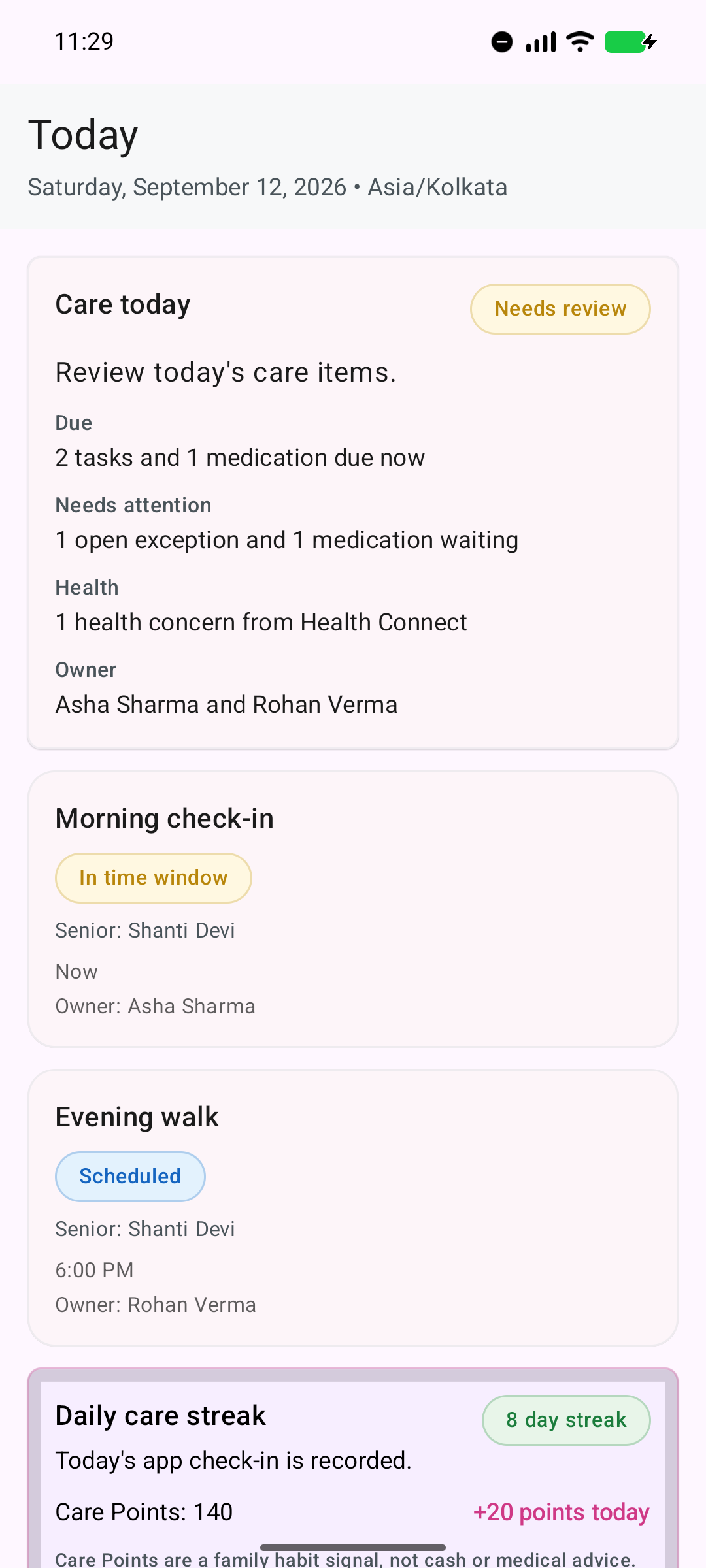
The current app shows fictional demonstration data, including time-aware tasks and named owners.
Ruxum includes guided starter plans that create editable routines for an initial pilot week. They are setup aids—not medical plans.
Begin with morning, meal, and evening checks plus a response map for who gets called and who can go in person.
Begin with morning, afternoon, and evening medication follow-through checks and add the real prescribed medicines separately.
Begin with recovery, report or appointment follow-up, and an evening symptom review after discharge.
Begin with routines that fit the family’s approved safety plan, contacts, and consent choices.
Begin with arrival, care-work, and completion checks for a trusted local helper chosen by the family.
Change the titles, times, days, owners, durations, and notes to match what the Senior and family actually need.
Care today brings due work, medicine state, exceptions, bounded health context, and ownership into one family summary.
The daily view is designed to answer the practical family question: “Is today’s care moving, and what needs attention now?”
Care today reflects information recorded or available to Ruxum. It is not independent proof that a visit, meal, medicine dose, walk, or other care action occurred.
Bring missed, late, unresolved, or conflicting work into the family’s review path.
Contact the Senior or task owner and understand whether the record, the plan, or the care situation changed.
Use a backup person, reschedule the work, or choose another safe follow-through action.
Move outside the routine workflow when an urgent health or safety concern requires direct help or emergency services.
The Senior home screen focuses on what matters now: medicines, the next check-in, the designated helper, a clear Get Help Now action, and direct access to 112.
Ruxum does not continuously watch the Senior, guarantee that a helper will respond, or dispatch emergency services. For an immediate threat to life or safety, call 112.
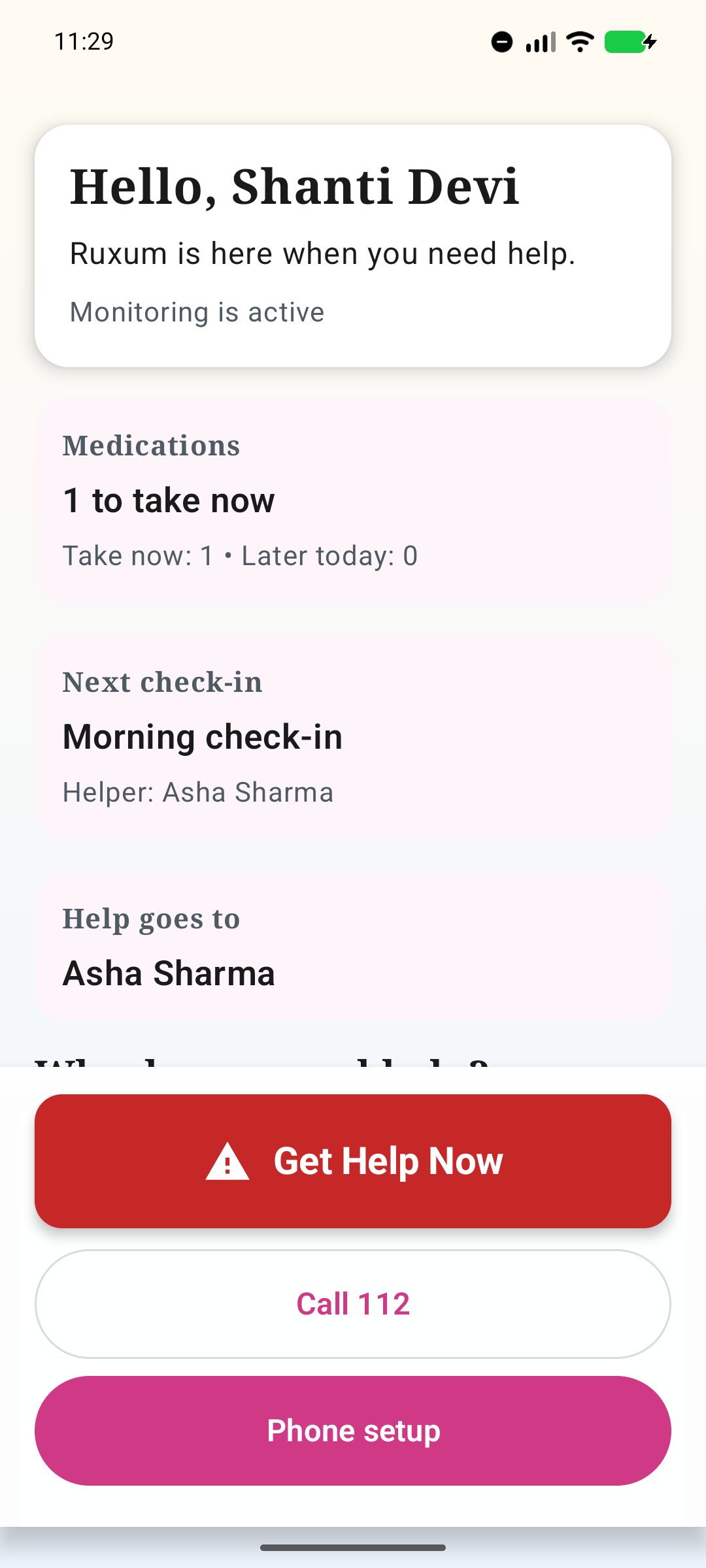
The screenshot comes from the current Android app and uses fictional demonstration data.
Useful status requires people to record accurate information and still exercise judgment when something feels wrong.
Arrival, completion, notes, and phone signals do not independently prove identity, presence, quality, or safety.
Ruxum does not diagnose, prescribe, choose medicines, or decide which routine is medically appropriate.
Optional signals are bounded by consent, permissions, freshness, and device conditions; they are not a live monitoring guarantee.
Ruxum does not recruit, vet, employ, certify, supervise, insure, or pay the helpers a family adds.
Notifications, sync, phone availability, network access, and human response can fail or be delayed.
Urgent situations still require direct contact with trusted people and the appropriate emergency service.
Give family members and trusted local helpers defined roles, assigned work, and backup paths.
Keep siblings, an elderly parent, and local support people aligned across cities and time zones.
Connect prescribed medicine reminders, recorded outcomes, optional stock awareness, and refill handoffs.
Track provider details, outcome notes, the next appointment, and follow-up work beside the daily plan.
Use optional health, phone-activity, and home or away context with consent, timestamps, and visible reliability limits.
A family can create household-specific recurring tasks such as morning check-ins, meal or hydration confirmations, walks, visits, errands, evening calls, and medicine-support checks. These are family-defined coordination tasks, not clinical instructions.
Yes. Ruxum supports daily, weekly, and custom-day schedules. Each schedule can include a start time, duration, Senior-home timezone, assigned helper, and optional notes.
Missed work and open exceptions can be brought into the family view for review. The family can contact the owner, reassign or reschedule work, use a backup contact, or escalate outside Ruxum when safety requires it.
No. A task status reflects information recorded in Ruxum. It is not independent proof that a person arrived, that care was performed correctly, or that an elderly parent is safe.
No. Ruxum is a family care-coordination tool, not a continuously staffed monitoring or emergency-dispatch service. For an immediate threat to life or safety, call 112 or the appropriate local emergency service.
Name the owner and backup path before adding optional signals or a larger care plan.